

Download Azure VPN Client – Secure Remote Access for Windows, Mac, Android & iOS
Secure & Reliable Cloud Access with Azure VPN Client
The Azure VPN Client is a powerful, secure tool designed to provide seamless remote access to Azure cloud resources. Whether you're a remote worker, IT administrator, or part of a distributed team, this software enables you to establish a point-to-site (P2S) virtual private network connection directly from your device. By using the Azure VPN Client, you can securely connect to your organization’s Azure virtual network from any location—ideal for employees working from home, on the go, or in hybrid work environments. The client is especially useful for businesses that rely on cloud infrastructure and require strict access controls. With support for Azure Active Directory (Azure AD) authentication, it ensures only authorized users can access sensitive data, enhancing overall security.
One of the standout features of the Azure VPN Client is its ease of integration with Windows 10 and Windows 11. Once installed, the client automatically configures the necessary network settings and integrates with your Microsoft account, streamlining the login process. It also supports multi-platform access, meaning you can use it on Mac, Android, and iOS devices—making it a versatile solution for modern, mobile workforces. The client leverages industry-standard protocols like IKEv2 and SSTP to ensure encrypted, stable connections, protecting your data from interception and cyber threats.
Moreover, the Azure VPN Client is designed with simplicity in mind. After downloading the client, you can import configuration packages provided by your IT administrator, eliminating the need for complex manual setups. This makes deployment across multiple devices efficient and error-free. Whether you're connecting to internal web services, accessing databases, or managing virtual machines, the Azure VPN Client delivers a secure, reliable, and consistent experience. With automatic updates and background operation permissions, the client maintains a persistent, secure tunnel without disrupting your workflow.
Key Features & Capabilities of Azure VPN Client
- Point-to-Site (P2S) VPN connectivity for secure cloud access
- Integration with Azure Active Directory (Azure AD) for strong authentication
- Support for Windows, Mac, Android, and iOS devices
- Automatic configuration via exported client packages
- Use of secure protocols: IKEv2, SSTP, and OpenVPN (when configured)
- Background operation with minimal performance impact
- Easy-to-use interface with one-click connection
- Multi-factor authentication (MFA) support for enhanced security
- Centralized management through Azure Portal and Azure AD
- Regular updates to ensure compatibility and security patches
One of the most valuable aspects of the Azure VPN Client is its seamless integration with Azure AD. This allows organizations to enforce identity-based access policies, ensuring that only verified users can connect to the corporate network. By combining Azure AD with conditional access policies, IT teams can restrict access based on device compliance, location, or risk level—making it a powerful tool for zero-trust security models.
The client’s ability to work across multiple platforms makes it ideal for modern, hybrid teams. Whether you're using a Windows laptop at home, a Mac on a business trip, or an Android tablet during a client meeting, the Azure VPN Client ensures consistent access to your organization’s cloud resources. The configuration process is straightforward: download the client, import the .zip configuration file, and connect with a single click.
Another key feature is the support for automatic updates. The client checks for updates in the background and installs them silently, ensuring you always have the latest security patches and performance improvements. This reduces the burden on IT departments and minimizes the risk of vulnerabilities due to outdated software. Additionally, the client runs efficiently in the background without consuming excessive system resources, making it suitable for long-term use.
How to Install & Use Azure VPN Client on Your Device
Installing and using the Azure VPN Client is a straightforward process, especially when you have the configuration package provided by your IT administrator. Begin by visiting the official Microsoft Azure portal and navigating to your virtual network gateway settings. From there, select the “Point-to-Site configuration” option and generate the client package. You’ll receive a .zip file containing all necessary configuration files and certificates.
Next, download the appropriate version of the Azure VPN Client for your operating system. For Windows users, the client is available through the Microsoft Store or directly from the Azure portal. Mac users can download the .dmg installer, while Android and iOS users can find the app in their respective app stores. Once downloaded, run the installer and follow the on-screen prompts. On Windows, you may need to enable the client to run in the background via Windows Settings > Privacy > Background apps.
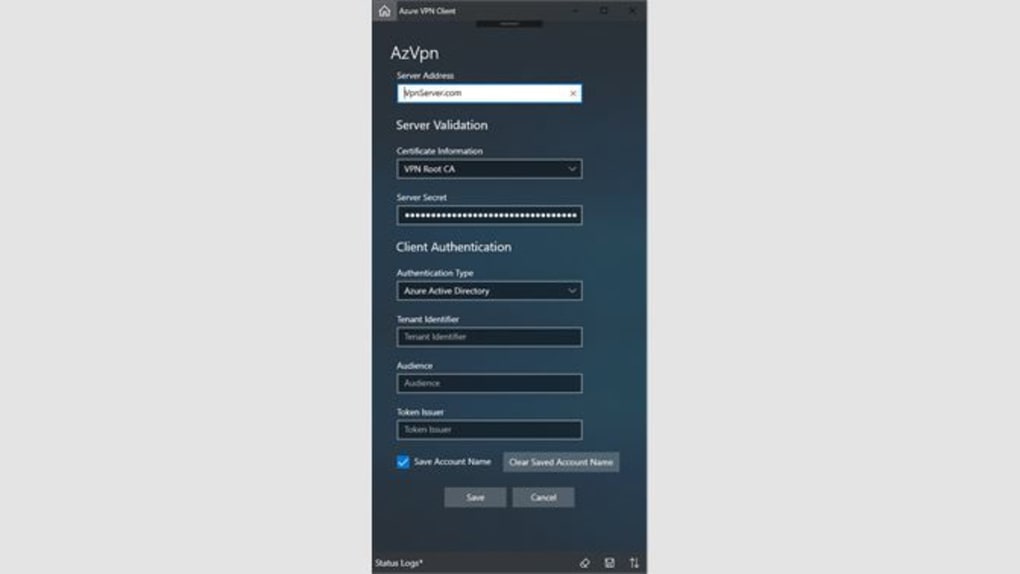
After installation, extract the .zip file you received from Azure and double-click the configuration file (usually named azurevpnconfig.xml). This will automatically import the settings into the Azure VPN Client. You’ll then be prompted to sign in with your Microsoft account or Azure AD credentials. If MFA is enabled, you’ll need to complete the second verification step.
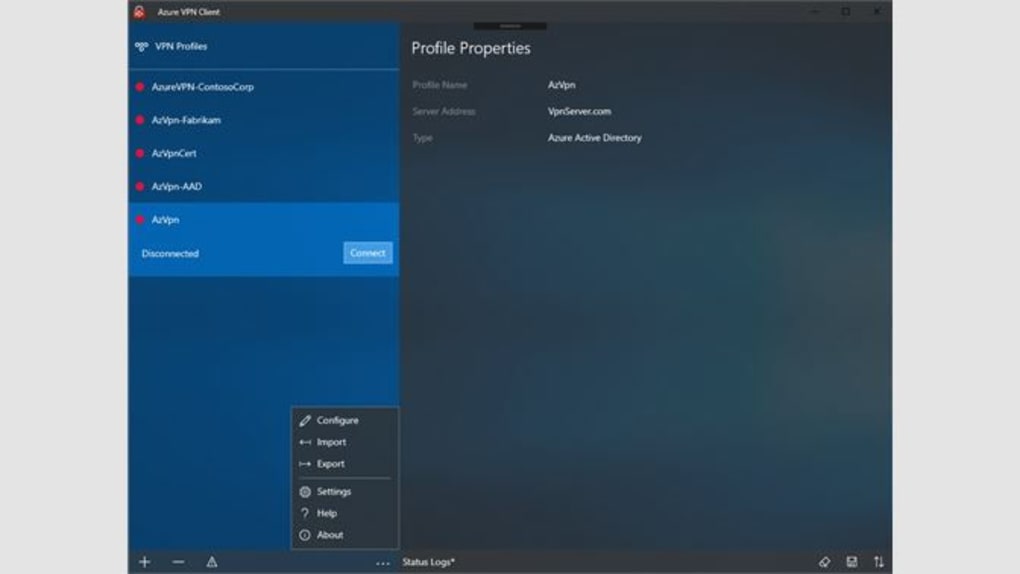
Once authenticated, you can connect to your Azure virtual network by selecting the connection from the client’s dashboard and clicking “Connect.” The connection is established within seconds, and you’ll see a confirmation in the system tray or status bar. To disconnect, simply click “Disconnect” in the client interface. The entire process is intuitive and requires minimal technical knowledge, making it accessible even to non-technical users.
Compatibility & System Requirements
The Azure VPN Client is compatible with a wide range of operating systems, making it a versatile choice for diverse teams. It supports Windows 10 (64-bit), Windows 11, macOS (10.15 or later), Android (8.0 or higher), and iOS (13.0 or higher). This broad compatibility ensures that employees using different devices can securely access Azure resources without limitations.
For Windows users, the client integrates seamlessly with the operating system’s network stack and supports both domain-joined and non-domain-joined machines. It also works well with enterprise security policies, including those enforced via Intune or Group Policy. On macOS, the client is built with Apple’s security frameworks in mind, ensuring compliance with Apple’s privacy and sandboxing standards.
Mobile users benefit from the native apps available on Android and iOS. These versions are optimized for touch interfaces and battery efficiency, allowing for long-duration connections without draining the device. The mobile apps also support push notifications for connection status and alerts, helping users stay informed.
While the client is free to download and use, it requires an active Azure subscription and proper configuration on the Azure side. IT administrators must set up the virtual network gateway with P2S enabled and configure Azure AD authentication. Without these prerequisites, the client will not function. However, once set up, the client provides a reliable, secure, and scalable solution for remote access.
Pros & Cons of Using Azure VPN Client
Pros
- Free to download and use with Azure subscription
- Strong security with Azure AD and MFA integration
- Multi-platform support: Windows, Mac, Android, iOS
- Easy configuration via exported client packages
- Automatic updates ensure security and stability
- Minimal system resource usage
- Seamless integration with Microsoft ecosystem
Cons
- Requires Azure subscription and admin setup
- Not available for Linux or other non-supported OS
- Initial setup requires IT involvement
- Mobile app has limited customization options
- Dependent on stable internet connection for consistent performance
Frequently Asked Questions (FAQ)
Final Verdict & Call to Action
The Azure VPN Client is a top-tier solution for organizations and individuals seeking secure, reliable, and easy-to-deploy remote access to Azure resources. With its strong security features, cross-platform compatibility, and seamless integration with Microsoft’s ecosystem, it stands out as one of the most trusted tools in the cloud connectivity space. Whether you're an IT admin managing remote teams or an employee connecting from home, this software delivers peace of mind with every connection.
While it requires initial setup by an administrator and a valid Azure subscription, the long-term benefits far outweigh the setup effort. The ability to connect securely from any device, combined with automatic updates and robust authentication, makes it a future-proof choice.
Ready to secure your remote access? Download the Azure VPN Client today and start connecting to your Azure resources with confidence.







